I usually post about my Wi-Fi troubles at This Old PC, but the focus of my tests of late have been the iBook G4, which is actually getting almost to the age at which it could be considered "old."
Bottom line, I'd like the wireless router to be able to hit both the iBook and This Old PC, which is in The Back Room, about 50 to 60 feet away. Sounds easy? But it's not. I think that This Old House's lath-and-plaster walls are made with some kind of metal grating that acts as a Faraday shield of sorts, keeping RF from getting into the house if it's too weak. At least that's the case with TV channels 2 and 4, which we have a hell of a time getting (no, we don't have cable).
And I don't want to have a wireless router kicking out 2.4 GHz RF, even at a tenth of a watt, a foot from my head all night. It just doesn't sound like a good idea. So there's one phone jack near the aforementioned head, another in the kitchen at the "telephone table" (this is a late-'40s house where the idea of a telephone nook must've been fashionable.) Well, even though it is only about 20 feet from the iBook, the signal was intermittent. And This Old PC couldn't get it at all.
So after a few months off of trying, I plugged in the router near the front door, probably 5 to 10 feet farther from the iBook, and the signal is virtually perfect. I checked in The Back Room, and This Old PC gets it pretty well (but the Wi-Fi card back there is more forgiving that the Airport Extreme in the iBook, so a weaker signal does better out there -- and since we use the iBook about 20 times as much, it has to be solid in This Old House).
I took it a step further, and now the router is in the coat closet near the front door. The perfect place for it to rest. If only there was a phone line and electrical plug in the closet. Not the kind of thing that 1940s houses are famous for.
But there's a light on the ceiling. It doesn't work -- I think the pull cord broke the first year we lived here. I've got a couple of spares somewhere in my shed (don't know why, but I've got them). And there are those thingies you can screw into a light socket to turn it into a two-pronged electrical socket. Almost none of this house is wired with three-prong electrical sockets anyway, so I'm used to not having them.
Anyway, if the light-socket-to-electrical-socket thing works, I can bring a phone line in through the floor and move the router and DSL modem in there permanently -- and the Wi-Fi that comes in to the bedroom will be super solid in the living room/dining room -- about 10 feet from the router.
I still have to check The Back Room to see how the signal is doing back there. I'm hopeful that it's good. Next would be a full test -- actually getting the modem itself up there (120V currently being supplied by a long extension cord) to do a couple of speed tests to make sure the connection is good.
And if that pans out, I'm gonna go wild and spend $19.99 on a refurbished Netgear 802.11g router (to replace the free 802.11b I'm running the tests with). Man, that's livin'.
Before anything more gets done, time to paint the house.
Friday, October 27, 2006


Thursday, October 26, 2006
System 7 Today's Dan Palka
Low End Mac interviews Dan, my System 7 guru, in two parts, with part 1 beginning today.
Seriously, if you've got a pre-G3 PowerPC Mac, you need to go to Dan's site, System 7 Today immediately. Even the site itself is powered by System 7.6.
Seriously, if you've got a pre-G3 PowerPC Mac, you need to go to Dan's site, System 7 Today immediately. Even the site itself is powered by System 7.6.
Friday, October 06, 2006
If an old Mac doesn't fall into your lap

The best way to get an old Mac is a) nearby and b) for free. But if you want pick of the litter, and are willing to part with cash to do so, some will try to fleece you, thinking their obsolete hardware is actually worth something (hint: it's NOT unless a lot of work is put into it, hence this and other Web sites like it).
But there are places selling used Macs at what look like good prices.
I just came across Computer Geeks.com, which has this page of desktop Macs (Here's an iMac G3 700 MHz for $189) and this one of laptops. The laptops are a bit pricey, but I'm not really up on what iBooks are going for.
And for those of us in California, Geeks.com is in Oceanside, so that means less $$$$ shipping for locals.
If you are in the market for an iBook G3, Other World Computing has this deal running: iBook G3s from $199 to $359.
Wednesday, September 13, 2006
Ask the Macist
 There's a great new column on the Laist blog called Ask the Macist. Here's the bio of its author:
About Chris Ullrich (aka the MACist): Chris is a frequent contributor to LAist
as well as other publications and also tweaks Macs (and PCs) for clients in the
Entertainment Industry.
Well, that's Entertainment Industry, capital E, capital I. But Ask the Macist is pretty darn good nonetheless. And since I need all the help I can get, I plan to mine it for all I can.
The first question, about running Windows programs on Macs, doesn't interest me because a) I don't have an Intel Mac, and b) I don't plan on getting one.
But the second question, on how to back up a Mac, is something that interests me greatly. Chris recommends one of those big Firewire drives that are available at the Apple Store and, of course, Fry's, and probably everywhere else you'd expect. He goes further to recommend three separate backup programs.
But one caught my eye.
Superduper backs up a Mac by mirroring the entire hard drive. In the event of a problem, you could boot the computer from the backup drive. Best of all, it only costs $27.95. At this price, I'm more than happy t
 o pay for something that is useful and not a gratuitious $300 that only a giant business can afford. The program is available for free download, but to "unlock scheduling, Smart Update (which saves a lot of time), Sandboxes, scripting and more!" you can register from within the program. So you can even try it for free (requires OS X 10.3.9 and above, by the way).
For such an important function, and at such a low price, it pays to register.
Wednesday, September 06, 2006
I love e-mailing to Blogger
Not that I have to do it very often, but if I
were blogging from the Powerbook, I'd probably post
via e-mail with Netscape 4.7.
Go into Settings, then E-Mail in the Blogger
Dashboard to set it up.
If only Movable Type had e-mail capabilities.
That's what the Daily News uses. If only ...
__________________________________________________
Do You Yahoo!?
Tired of spam? Yahoo! Mail has the best spam protection around
http://mail.yahoo.com
Power Mac G5
I told my mom I would start looking after her Power Mac G5 -- you know, they look like something off the original "Star Trek" set. It's about 3 years old. It's currently running 10.3.2, I believe.
First thing, I don't have the password. Her "consultant" says it doesn't have one set up. Is that possible? I'll have to check that out. When she got this box, he said her Netgear router would no longer work, and he took it and replaced it with some weird hub. I'm going to get another Netgear router -- better to have the hardware firewall AND the ability to share the Internet connection if needed.
Second thing, gotta check the memory. If it's got 512 MB, it's time for 10.4 (or for more memory and 10.4).
And we need to figure out a backup solution. Probably one of those 250 or 500 GB USB/Firewire drives.
First thing, I don't have the password. Her "consultant" says it doesn't have one set up. Is that possible? I'll have to check that out. When she got this box, he said her Netgear router would no longer work, and he took it and replaced it with some weird hub. I'm going to get another Netgear router -- better to have the hardware firewall AND the ability to share the Internet connection if needed.
Second thing, gotta check the memory. If it's got 512 MB, it's time for 10.4 (or for more memory and 10.4).
And we need to figure out a backup solution. Probably one of those 250 or 500 GB USB/Firewire drives.
Dance with the sofware that brought you
I took This Old PC from Windows 98 to 2000. I won't go to XP. It came to me with Office 97. I won't upgrade it. I added free virus software Avast, which my friend Bruce says is better than Norton/Symantic. Firefox? Check. And I'm about to try IE 6. It's got Wi-Fi and Ethernet (both added by me). USB 1.1 (I haven't bothered to even think about 2.0).
Also added: Optical mouse (for no good reason); TDK CD burner (years ago) that never could burn an audio disc without clicks and dropouts; and Iomega ZIP USB (works flawlessly). I stuffed the box with as much memory as I could, and it recognizes 262 MB of it.
To change OS or Office versions at this point would be unwise -- it works as well as it's ever going to. If for some reason I need to open Word files in some "higher" version, I'll install Open Office, but I hope to avoid it.
This Old Mac, the Powerbook 14oo, went from OS 7.5.3 to 7.6.1. I added 32 MB of memory for a total of 48 MB. The best "new" software I got was LiteSwitch (from System 7 Today), which enables me to switch programs with Command-tab, just like in OS X and on Windows. And it is light.
The PB still runs Office 6. No plans to upgrade that, either. Even though that MS package is "Optimized for Power PC," it's slow enough. The best thing I did: Adding Internet Explorer 5 (which I also got from System 7 Today). I downloaded a bunch of stuff -- every version of Netscape I could find, iCab, Eudora and more, almost all of which I've deleted because it doesn't work (or work well). I kept WriteNow (but haven't used it much). What's nice is that 7.6.1 is loaded with great stuff, from valuable utilities to full-blown software (principally ClarisWorks).
It's all about hitting the sweet spot. Still, it's sometimes better to have an application work poorly (slowly) than not to have it at all. As long as you've got a swifter alternative (or a lot of patience).
Also added: Optical mouse (for no good reason); TDK CD burner (years ago) that never could burn an audio disc without clicks and dropouts; and Iomega ZIP USB (works flawlessly). I stuffed the box with as much memory as I could, and it recognizes 262 MB of it.
To change OS or Office versions at this point would be unwise -- it works as well as it's ever going to. If for some reason I need to open Word files in some "higher" version, I'll install Open Office, but I hope to avoid it.
This Old Mac, the Powerbook 14oo, went from OS 7.5.3 to 7.6.1. I added 32 MB of memory for a total of 48 MB. The best "new" software I got was LiteSwitch (from System 7 Today), which enables me to switch programs with Command-tab, just like in OS X and on Windows. And it is light.
The PB still runs Office 6. No plans to upgrade that, either. Even though that MS package is "Optimized for Power PC," it's slow enough. The best thing I did: Adding Internet Explorer 5 (which I also got from System 7 Today). I downloaded a bunch of stuff -- every version of Netscape I could find, iCab, Eudora and more, almost all of which I've deleted because it doesn't work (or work well). I kept WriteNow (but haven't used it much). What's nice is that 7.6.1 is loaded with great stuff, from valuable utilities to full-blown software (principally ClarisWorks).
It's all about hitting the sweet spot. Still, it's sometimes better to have an application work poorly (slowly) than not to have it at all. As long as you've got a swifter alternative (or a lot of patience).
"The Good Old Days of Computing"
On Low End Mac, Tommy Thomas writes about "The Good Old Days of Computing," going back to the early '90s and before. I guess it's all nostalgia when you look back.
I continue to be troubled by the disposable nature of computer hardware. That's a lot of stuff to be throwing out, and a lot of expense, too, especially if you're talking about a current Mac. I don't think there's a desktop or laptop under $1,000 in the line now, except for the Mac Mini. (On second reading, the moral of this story is, "Get a Mac Mini already!") And you can get a bare-bones Windows box from Fry's for $300 or even less. That's when "disposable" doesn't hurt the pocketbook so much.
But still, it would be nice to both get a few more usable years out of a computer and be able to either upgrade its hardware or recycle the whole damn thing.
It all depends on what you want to do with the box. At this point, I have to say that Web browsing is the No. 1 "killer app" for most people. As long as your hardware, operating system and software can handle most of the Web-browsing tasks out there, you can stick with your system. If you're comfortably running OS X, there's Safari and Firefox.
OS 9? You can stick with Internet Explorer 5.1 and whatever version of Netscape will work. Not bad, but not ideal. Once you start dipping back to OS 8 and 7, it gets even murkier.
I'm no expert on OS 8 or 9, but for OS 7 (I'm now using 7.6.1), pickings are rather slim. The original IE 5 for Mac still works fairly well, but not on all sites, and you'll have trouble with Java and Flash. I've never gotten iCab to work without crashing fairly often, but I'm willing to try again. And I use Netscape 4.7 for e-mail because I have never been able to get any 7.6.1-compatible e-mail program to work with my POP account.
My Powerbook 1400 already had Office 6 installed (plus Appleworks if I need it). It has a working Powerport Platinum card with 10baseT Ethernet. I can do a little bit on the Web, check my various Web-based e-mail accounts, go on Google Groups, and send e-mail from Netscape if I'm so inclined. But I can write Word-formatted files and e-mail or transfer them out of there, and that's my killer app. It's all in the friendly Mac interface. And the hardware cost me nothing.
Let's be frank, I'd love to have a second iBook. Our current 14-inch iBook G4 has held its value very well over the three years we've had it. I can't see having problems using it for another four or five years, I think (and I hope). It's running OS X 10.3.9, and we've got Firefox and Office on there, too. It burns CDs but not DVDs. (I wish it had the Superdrive, of course.) And it's a very nice computer to use. Would I acquire another one in a couple of years if I could get it near $200? You bet. Current used prices through dealers are $600-900. Now that's holding value.
iBook G3s are cheaper, going for $250-$500, but they already can't run 10.4. Not that I'm running anything past 10.3.9 right now -- or need to. If you can get a good one for $300, that could serve you well for a few years.
$300 for three years? How does that differ from $1,000 for six years? Well, it's cheaper up front AND on a per-year basis. Even if the $300 computer only lasted two years, you'd still be money ahead. You wouldn't have "enjoyed" the first years of a completely new computer, but you will have saved some money. And if you don't keep it as your main computer, that $300 laptop could go years longer in limited use.
This may sound a little strange coming from This Old Mac, which champions the continued use of 10-year-old hardware, but I've always said that if you're going to have only one computer, it's nice to have one that does everything you need it to do. A second, third or even fourth computer can be less powerful -- if you need to do something the older box can't do, you've got options. Of course all this depends on whether or not you've got the money for a new PC. $1,000 ain't chicken feed.
While Microsoft is trying to make everybody upgrade to XP and Vista, there's still a lot of life left in Windows 2000 (which I run on This Old PC) and maybe a bit 'o life in Windows 98 (though the inability to get Wi-Fi and card readers working in that OS prompted me to upgrade). And you can still run IE 6 and Firefox in both 2000 and 98, providing your hardware can keep up.
The bottom line for old-Mac users (different than old Mac users, no hyphen) is the waning support for the classic Mac OS. Not everybody can (or should) be running OS 9, and even then there are problems. From my browser-centric prospective, there should be a Safari AND a Firefox for -- at the very least -- OS 9.
It won't happen.
There's a lot you can do with older hardware. Do what it does best, don't spend a lot of money and you'll be happier.
The questions I am asking myself: What's the usable life span of a computer? Is that life span changing -- getting longer or shorter? And how do you compute the most efficiently for the least amount of money and waste?
While much depends on individual circumstances, configurations and needs, I think the average computer life span is holding steady at eight years. I think you have five good years and three iffy ones. Then it becomes a stealthy game of upgrades, tricks and compromises to keep the machines relevant.
That's where This Old Mac and This Old PC come in, at least for me. I wouldn't be subjecting myself to this if I didn't in many ways enjoy it. It's the thrill of victory over free hardware, of making something thought useless work -- and sometimes work well. And I do get a kick, although sometimes I wonder where, out of actually using these older boxes.
Next: I assume responsibilities for a Power Mac G5, which doesn't seem old but isn't exactly new in the wake of Intel Duo Cores and all that. Do I take it to 10.4 or 10.5? What's the best/cheapest backup solution out there today?
First thing -- a Power Mac G5, purchased the same year as an iMac G4, will last longer. Costs more, too.
Second thing -- I guess I should start a This New Mac blog, but I won't. All Power Mac G5 news will remain here. It'll be old soon enough when the Intel Trio Cores (or whatever they want to call them) and OS XI (or whatever they want to call THAT) rear their respective heads.
I continue to be troubled by the disposable nature of computer hardware. That's a lot of stuff to be throwing out, and a lot of expense, too, especially if you're talking about a current Mac. I don't think there's a desktop or laptop under $1,000 in the line now, except for the Mac Mini. (On second reading, the moral of this story is, "Get a Mac Mini already!") And you can get a bare-bones Windows box from Fry's for $300 or even less. That's when "disposable" doesn't hurt the pocketbook so much.
But still, it would be nice to both get a few more usable years out of a computer and be able to either upgrade its hardware or recycle the whole damn thing.
It all depends on what you want to do with the box. At this point, I have to say that Web browsing is the No. 1 "killer app" for most people. As long as your hardware, operating system and software can handle most of the Web-browsing tasks out there, you can stick with your system. If you're comfortably running OS X, there's Safari and Firefox.
OS 9? You can stick with Internet Explorer 5.1 and whatever version of Netscape will work. Not bad, but not ideal. Once you start dipping back to OS 8 and 7, it gets even murkier.
I'm no expert on OS 8 or 9, but for OS 7 (I'm now using 7.6.1), pickings are rather slim. The original IE 5 for Mac still works fairly well, but not on all sites, and you'll have trouble with Java and Flash. I've never gotten iCab to work without crashing fairly often, but I'm willing to try again. And I use Netscape 4.7 for e-mail because I have never been able to get any 7.6.1-compatible e-mail program to work with my POP account.
My Powerbook 1400 already had Office 6 installed (plus Appleworks if I need it). It has a working Powerport Platinum card with 10baseT Ethernet. I can do a little bit on the Web, check my various Web-based e-mail accounts, go on Google Groups, and send e-mail from Netscape if I'm so inclined. But I can write Word-formatted files and e-mail or transfer them out of there, and that's my killer app. It's all in the friendly Mac interface. And the hardware cost me nothing.
Let's be frank, I'd love to have a second iBook. Our current 14-inch iBook G4 has held its value very well over the three years we've had it. I can't see having problems using it for another four or five years, I think (and I hope). It's running OS X 10.3.9, and we've got Firefox and Office on there, too. It burns CDs but not DVDs. (I wish it had the Superdrive, of course.) And it's a very nice computer to use. Would I acquire another one in a couple of years if I could get it near $200? You bet. Current used prices through dealers are $600-900. Now that's holding value.
iBook G3s are cheaper, going for $250-$500, but they already can't run 10.4. Not that I'm running anything past 10.3.9 right now -- or need to. If you can get a good one for $300, that could serve you well for a few years.
$300 for three years? How does that differ from $1,000 for six years? Well, it's cheaper up front AND on a per-year basis. Even if the $300 computer only lasted two years, you'd still be money ahead. You wouldn't have "enjoyed" the first years of a completely new computer, but you will have saved some money. And if you don't keep it as your main computer, that $300 laptop could go years longer in limited use.
This may sound a little strange coming from This Old Mac, which champions the continued use of 10-year-old hardware, but I've always said that if you're going to have only one computer, it's nice to have one that does everything you need it to do. A second, third or even fourth computer can be less powerful -- if you need to do something the older box can't do, you've got options. Of course all this depends on whether or not you've got the money for a new PC. $1,000 ain't chicken feed.
While Microsoft is trying to make everybody upgrade to XP and Vista, there's still a lot of life left in Windows 2000 (which I run on This Old PC) and maybe a bit 'o life in Windows 98 (though the inability to get Wi-Fi and card readers working in that OS prompted me to upgrade). And you can still run IE 6 and Firefox in both 2000 and 98, providing your hardware can keep up.
The bottom line for old-Mac users (different than old Mac users, no hyphen) is the waning support for the classic Mac OS. Not everybody can (or should) be running OS 9, and even then there are problems. From my browser-centric prospective, there should be a Safari AND a Firefox for -- at the very least -- OS 9.
It won't happen.
There's a lot you can do with older hardware. Do what it does best, don't spend a lot of money and you'll be happier.
The questions I am asking myself: What's the usable life span of a computer? Is that life span changing -- getting longer or shorter? And how do you compute the most efficiently for the least amount of money and waste?
While much depends on individual circumstances, configurations and needs, I think the average computer life span is holding steady at eight years. I think you have five good years and three iffy ones. Then it becomes a stealthy game of upgrades, tricks and compromises to keep the machines relevant.
That's where This Old Mac and This Old PC come in, at least for me. I wouldn't be subjecting myself to this if I didn't in many ways enjoy it. It's the thrill of victory over free hardware, of making something thought useless work -- and sometimes work well. And I do get a kick, although sometimes I wonder where, out of actually using these older boxes.
Next: I assume responsibilities for a Power Mac G5, which doesn't seem old but isn't exactly new in the wake of Intel Duo Cores and all that. Do I take it to 10.4 or 10.5? What's the best/cheapest backup solution out there today?
First thing -- a Power Mac G5, purchased the same year as an iMac G4, will last longer. Costs more, too.
Second thing -- I guess I should start a This New Mac blog, but I won't. All Power Mac G5 news will remain here. It'll be old soon enough when the Intel Trio Cores (or whatever they want to call them) and OS XI (or whatever they want to call THAT) rear their respective heads.
Monday, August 28, 2006
Happy 11th birthday, Powerbook 5300c
 Charles W. Moore has a great article at Low End Mac on the 11th birthday of the Macintosh Powerbook 5300c, Apple's first PowerPC laptop.
First off, this 1995 model had the same problem that plagued iBook G4 and Powerbook G4 computers last week -- flaming batteries:
Even before the 5300 began shipping in quantity, it suffered a major engineering setback and PR disaster that is ironically seems ripped from the headlines in August 2006. The 5300 was originally designed to use lithium-ion (LiIon) batteries, but Apple did a recall and switched to Nickel-Metal-Hydride (NiMH) cells after two of the Sony-made LiIon batteries caught fire.
No consumer machines were damaged, but the switchover caused shipping delays and was a major embarrassment.
This will make you feel good about today's computer prices:
In addition to being the first PowerPC PowerBook, the 5300 also has the distinction of being the most expensive laptop Apple ever sold, with the top-end 5300ce model originally selling for a whopping $6,500!
Give the article a look -- it's well worth reading for old Mac aficionados.
Friday, August 25, 2006
Dodging the iBook G4 battery-recall bullet
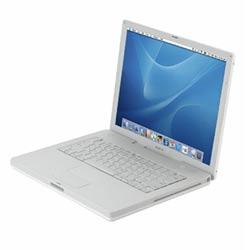
When I heard about Apple's notebook-computer battery recall, I figured it must be the new MacBook Pros or something equally new. I was suprised that the recall -- for potentially explosive batteries -- was for the iBook G4 and Powerbook G4. Here are the computers involved:
Affected ranges of battery serial number prefixes are as follows:
12-inch iBook G4, battery model: A1061
ZZ338 through ZZ427
3K429 through 3K611
6C510 through 6C626
12-inch PowerBook G4, battery model: A1079
ZZ411 through ZZ427
3K428 through 3K611
15-inch PowerBook G4, battery models: A1078 and A1148
3K425 through 3K601
6N530 through 6N551
6N601
The serial number can be located on most models by removing the battery and looking at its underside.
Additional information is available via Apple's Recall Hotline: (800) 275-2273
To check if your PowerBook or iBook is affected, visit https://support.apple.com/ibook_powerbook/batteryexchange/.
Since we have a 14-inch iBook G4, there appears to be no problem and hence no recall. But I'll be pulling the battery and checking the model number just the same. The battery never gets all that hot. The left side of the iBook, however, does get pretty warm at times -- I think that's where the CPU and other chips reside (not sure of this, though). The Powerbook 1400, whose battery can hold a 30-minute charge on a good day, never gets warm -- even its CPU area, which is just above the keyboard on the right, stays pretty cool. there's a very good heat sink over it. I saw all when I did the memory upgrade a few months back (probably the easiest upgrade I've done on any piece of electronic equipment in some time -- even easier than adding Airport Extreme to the iBook).
Monday, August 14, 2006
My SCSI is scuzzy
 I've tried three separate SCSI drives on the Powerbook 1400, and none of them work. I tried the drives on OTHER computers, and they do work.
Conclusion: SCSI on the Powerbook 1400 is dead. Since this PB probably was NEVER connected to a SCSI device in its entire life, the problem has been there for 10 years.
I wonder if opening up the case and looking for a loose or broken connection between the SCSI port and the main board will solve the problem. I wonder what kind of voltages, on what pins, I should look for to fix this.
Or ... I could live without SCSI and do all my transfers and backups via Ethernet, which DOES work.
Still, I'd love to fix the SCSI. I've got four SCSI drives (all free) -- two ZIPs, one hard disk, one Jaz -- and nothing to plug them into. On the other hand, if you've ever seen the cables that plug into these drives, especially the ones that mate with the Powerbook's weird-looking square plug, you should immediately give thanks for the thin, easily plugged-in cables for Ethernet and, of course, USB.
Tuesday, August 08, 2006
I'm thinking of getting an iMac (updated)
 I read on the iMac list that you can run OS X on an iMac. And I'm inclined to secure one from Bruce (yep, he has one -- a 266 MHz, the first iMac, I believe) and try to load the X. Hopefully I have OS X on CD and not DVD (have to check on that). It might be too slow, but the lure of running X with Safari is too tempting.
But it looks like you need a newer iMac to run OS X effectively.
Update: Yep, this tray-loading iMac 266 runs some flavor of OS 8, and besides needing an 8 MB disk partition to even start trying to run OS X, it's probably not wise to take it past OS 9.
Tuesday, August 01, 2006
Powerbook 1400 love
 There's a lot of love out there for the Macintosh Powerbook 1400. You'd think a 10-year-old laptop with a maximum 64MB RAM, no OS X, no Cardbus compatibility, no USB and doable but difficult wireless access wouldn't inspire such loyalty. But it does.
On Low End Mac, Embracing Obsolescence columnist Nathan Thompson calls the 1400 "one of the best Powerbooks ever":
While the 1400 is cased in the familiar mid nineties PowerBook gray and the iBook has the lovely minimalist white design of new millennium Macs, I definitely see a family resemblance. It may not be the sexiest design ever, but I find the 1400 pleasantly simple. Some may apply the boring label in comparison to more modern Apple designs, but I can appreciate the simple fender flare on either side near the front if one were commencing to engage the PowerBook for operation.
If one were a simple onlooker from afar, a gander at the nice clear customizable upper case lid plastic would reveal the lone bout of whimsy. Again, it's easily hidden if one is of a more dour persuasion than I, given the possession of the plain gray lid cover.
He's spot on about the RAM issue (I'm also running 48MB):
... the biggest issues I have is a far too low RAM ceiling. I can make 64 MB RAM work, but I would prefer 128 MB - even 96 MB would give me some room to grow. As it is, I'll make due with 48 MB because the jump to 64 MB doesn't seem that big a gain for the expenditure required.
Yet he's running memory-hungry OS 9.1 (I'm sticking with 7.6.1 per guru Dan Palka):
I can get Mac OS 9.1 to run, and most of my applications demand very little in the way of system resources, but Mac OS 8.1 or 8.6 are most likely better choices - especially for those 1400's lacking at least the 48 MB RAM my own model was blessed with.
He had trouble with Ethernet, but as with all things 10 years old, the answers are out there. We have the same Global Village card, and 10 years ago, when Ilene first got the 1400, who knew anything about Ethernet? We connected by modem at 22K -- and we LOVED it. Now no one has dialup, and I'm amazed that the Global Village card connects via 10base-T Ethernet either to a network or straight into my DSL modem. Thanks, Open Transport!
Another of Nathan's articles, "Customizing Mac OS 9," which had a lot of Powerbook 1400-specific info, led me to a new e-mail program that just might end my dependence on Netscape 4.7. (YES, I've tried Eudora, and NO, the versions that run on 7.6.1 don't work with my e-mail accounts.) It's a program called Sweetmail, and the Web site says it works on System 7.5, provided you have a few add-ons, to which they provide the links.
Among the Powerbook 1400 users out there are Marko Kloos of Knoxville, Tenn., who wrote "The Volvo of Laptops," commenting as Nathan does on the 1400's unusually comfortable keyboard:
They also have one of the best keyboards ever put on a portable computer... not quite up to the standard of the IBM Model M desktop keyboard, but far better than anything put on any laptop made after 1998 or so. When you type a lot, your choice of keyboard becomes a deciding factor when it comes to hardware decisions, so it's no surprise to me that the PB 1400 is a sought-after machine among writers.
Crazily enough, he stuffed the thing with a 40GB hard drive that he pulled from a Dell:
Now the Dell is in reserve as a spare computer, and the Powerbook continues to be in service as a word processor, despite the fact that the Dell is four or five years younger and vastly superior on paper. The little Powerbook has a smaller screen, far less memory, and a tenth of the processing power of the Dell, but it feels more solid, has a far superior typing surface, and seems better put together all around.The 1400 still chugs along, and it works just as well as the day it did when it left the factory. It's a remarkably sturdy machine, and it does the job at hand just as well as anything else. That led me to ponder the necessity for keeping up in the technology race--how much hardware do you need, and how much is "plenty good enough"?
...
Simplify.
What an interesting concept. It's certainly easier on the pocketbook.
By the way, he's running 7.6.1.
Getting back to Nathan, he dropped these links into his Low End Mac article, and I'm too lazy to do anything other than present them here for you in exactly the same way:
PowerBook 1400: Dated and a Bit Slow, It's Still Very Usable, Dan Knight, 2006.01.06
Replacing or Upgrading the Optical Drive in Your PowerBook G3 or 1400, Joe Rivera, 2006.01.24
What's a Good, Inexpensive, Useful, Older Mac? The PowerBook 1400, Thomas Ahart, 2006.02.01
System 7.6.1 Is Perfect for Many Older Macs, John Martorana, 2006.03.24
PowerBook 1400 Still a Favorite Nearly 10 Years On, Heather Anne Hurd, 2006.06.07
PowerBook 1400 one of the best PowerBooks ever, 07.21. "How embarrassing for me to be so taken my a computer, but I am greatly impressed."
In my own Powerbook 1400 journey, I'm currently having trouble getting the Iomega ZIP drive and the Powerbook to become good friends. Computer guru Bruce went into his shed and found a cable that plugs into the Powerbook's unusual SCSI port (HDI30, I believe) and has a DB25 female plug on the other end. The only problem: the ZIP SCSI drive also has a DB25 female plug, so I need either a "gender changer" (don't ... get ... me ... started) or a DB25 male-to-male cable (again ... DON'T GET ME STARTED). I'm sure Bruce has got 2o of these in a box. I do have a Powerbook SCSI cable that ends in a Centronics plug, and I also have a 2GB hard drive that connects to this, but I can't get them to speak with one another. I need a driver for a ClubMac drive. Who knows where to get it?
The worst things about SCSI: There are about 20 different kinds of SCSI cables, those cables MUST be of high quality and fully shielded, and you need to set SCSI IDs on each device, slap on a terminator at the end of the chain, and then make sure they're all powered up before turning the computer on. THEN you need special drivers (hard to come by for old devices you pull out of junk boxes).
It makes one positively giddy for USB. Don't take USB for granted, people. It's the one thing that makes me pine for a Pismo Powerbook. It makes our iBook G4 seem positively futuristic.
That said, until such an iBook falls into my lap, I'm making the 1400 work, dammit.
In the PC vs. Mac horse race, This Old PC has, at this point 112 unique visitors, while This Old Mac has only 42. They're both worth checking out. You know, if I could get Microsoft Outlook to run on OS 9, I just might get rid of the PC and get an iMac in The Back Room to replace This Old PC. Just a thought.
Wednesday, July 12, 2006
This Old Heathkit
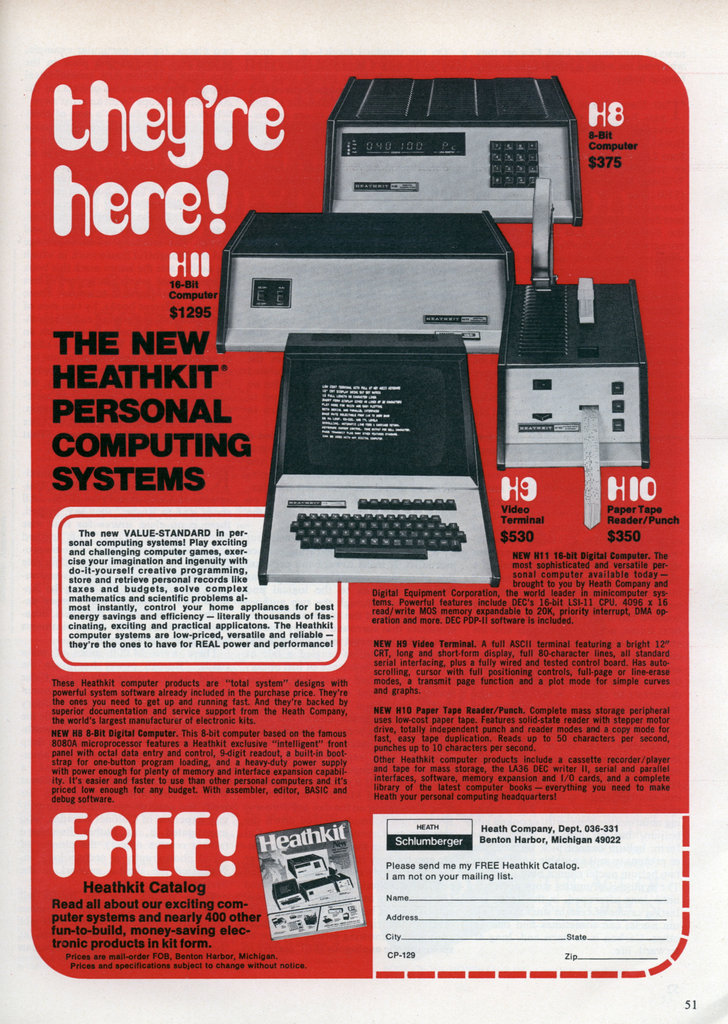
I have a vague memory of The Heathkit H8 computer. To supplement its bread-and-butter amateur radio business, the Heathkit company made quite a stab at staying relevant as the years went by, offering early computers, robots and other things you could build at home and save a few bucks on while learning the art and science of electronics. This fascinating ad and way, way more are available to see at Modern Mechanix. Go to Communications or Computers first.
I remember the Heathkit catalogs from the '80s -- I think the company pretty much faded out by the early '90s. You could build kit versions of ham transceivers and accessories, to be sure, but I think they also had kit TV sets, stereo equipment, even small radios for those who didn't have a mint to drop on something that might not work once you got done with all that soldering. I think Heath had a diagnostic service -- you could send the finished kit back to them if it didn't work, and they would help you out. But part of the kit and its instructions were troubleshooting instructions, and I also remember that for ham radios, you needed a VTVM -- a vacuum tube volt meter -- which itself went for about $100 in the '80s in order to properly align the circuits.
I bet there's quite a market for Heathkits, assembled and the rare unassembled ones, on eBay. I wish I saved some of those old catalogs, that's for sure.
Not to get off track, but this gets me to thinking about old Radio Shack catalogs, which I remember getting every year from one of the local stores -- we had one in the now-mowed-over Laurel Plaza shopping mall in North Hollywood (where I built about three "Perf Box" shortwave radios, cost $7.98 each, with coils wound around AA batteries -- and none of which ever worked) . I always wanted one of these DX-160 shorwave receivers. This is the kind of thing that fuels eBay -- buying the stuff we could never get as kids but which now is cheap, even if it doesn't work all that well.
Thursday, July 06, 2006
System 7 Today
For those running Macs of a certain vintage, especially the PowerPC era, the way to get the most out of your computer is to run System 7, primarily System 7.6.1. How do I know this? I learned everything from Dan Palka of System 7 Today. Dan makes a very good case as to why you should run 7.6.1, even if you have enough memory to go to System 8, and even if you think you're happy with 7.5.3, or something even earlier. Dan is also active on the e-mail lists at Low End Mac, my other beacon of old and moldy Macintosh knowledge, especially the Powerbook list.
More on Low End Mac later. On System 7 Today, besides a lot of knowledge, Dan provides plenty of free utilities and software to make your old Mac as productive as it can be. It was through him that I procured the one program that turned out to be the saving grace of This Old Mac: Internet Explorer 5. Don't laugh. In my opinion, it is the best browser for 7.6.1. I'd like to say iCab is better, but while many Web sites look better in iCab, it just isn't as stable as IE5.
And don't get me started on e-mail programs. After much testing on my part (and some of this is due to my ISP, no doubt), the only way I can get e-mail through a POP account is with Netscape 4.7, which though supposedly "tuned" to the PowerPC chip is very slow. But it does work, and it allows offline reading of mail and Usenet news. Now my "lifestyle," or should I say computing style makes it better for me to read mail via the Web, so I'm sticking with Yahoo! and IE5 as the best solution for the moment. For those who can run OS 9, I do recommend Netscape 7, but that is pretty much a pipe dream for Mac OS 7.
Anyway, Dan is a very good guy to know, and what's amazing is that he's in his early 20s. Now it's not unusual for somebody that young to have a lot of computer knowledge. But about systems and software that is 10 years old?
More on Low End Mac later. On System 7 Today, besides a lot of knowledge, Dan provides plenty of free utilities and software to make your old Mac as productive as it can be. It was through him that I procured the one program that turned out to be the saving grace of This Old Mac: Internet Explorer 5. Don't laugh. In my opinion, it is the best browser for 7.6.1. I'd like to say iCab is better, but while many Web sites look better in iCab, it just isn't as stable as IE5.
And don't get me started on e-mail programs. After much testing on my part (and some of this is due to my ISP, no doubt), the only way I can get e-mail through a POP account is with Netscape 4.7, which though supposedly "tuned" to the PowerPC chip is very slow. But it does work, and it allows offline reading of mail and Usenet news. Now my "lifestyle," or should I say computing style makes it better for me to read mail via the Web, so I'm sticking with Yahoo! and IE5 as the best solution for the moment. For those who can run OS 9, I do recommend Netscape 7, but that is pretty much a pipe dream for Mac OS 7.
Anyway, Dan is a very good guy to know, and what's amazing is that he's in his early 20s. Now it's not unusual for somebody that young to have a lot of computer knowledge. But about systems and software that is 10 years old?
Tuesday, June 27, 2006
This Old Commodore
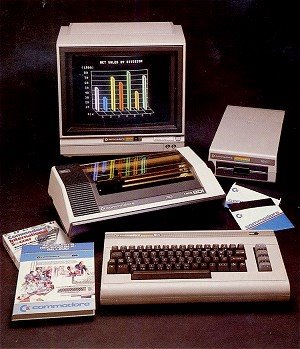
The L.A. Times did a story on devotees of the old Commodore 64 and VIC-20 computers pegged to a user group in Fresno. That's even farther back than This Old Mac:
In an era when a home computer's power is measured in gigabytes, (Robert) Bernardo still counts kilobytes as a devoted Commodore user 12 years after the last machine was assembled.
Once the largest personal computer maker in America, the company behind the VIC-20 and the Commodore 64 introduced millions of people like Bernardo to the digital age. The company went out of business in 1994, but its legacy survives in dozens of Commodore clubs around the country.
Bernardo presides over the Fresno chapter.
Never mind that the VIC-20 has so little usable memory — just 3.5 kilobytes — that it can store only a couple of pages of text in its buffers. Or that Commodore hardware was notoriously clunky and buggy. Bernardo still manages all his e-mail on a 1980s-vintage Commodore 64.
"I've never considered the Commodore obsolete," Bernardo said. "I can still do many things with it — e-mail, browse the Web, word processing, desktop publishing and newsletters. I still do games on it: new games that are copyright 2006, ordered from Germany."
Web browsing on a Commodore 64? If that's possible, anything is. Here's one way to do it on the C64 and lots of other 8-bit hardware, including the Apple ][, VIC-20 and even Game Boy. Here's another place to start for those who want to resurrect and/or trick out a C64.
It makes This Old Mac seems so ... newfangled. And there must be millions of C64s lying around in closets, garages and who knows where. It reminds me of my first computer, a Sinclair ZX81, which actually sold for something like $99 back when "real" computers were still going for $1,000-plus. True to its name, the ZX81 came on the market -- in both preassembled and kit forms-- in 1981. The whole Sinclair c
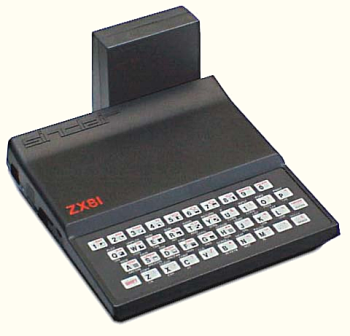 omputer phenomenon was huge in England, but it did have some impact here, too. Start here for some Sinclair history. I kept my Sinclair stuff -- including the crudely printed magazine I subscribed to that featured programs you would type in line by tedious line. At some point, I sold the whole lot at a garage sale for about $10. As you can see, they're still big in Germany, and you can still buy one and build it yourself for $99.
Tuesday, June 13, 2006
This Old Mac
This Old Mac is a Powerbook 1400cs/117 mHz, originally with 16 MB RAM and a 750 MB hard drive. Ilene has had it for about 10 years now, and I first had the notion a couple of months ago of updating it and seeing if I can use it as a working laptop. I've learned a lot from the Web, and I will share that knowledge here in the near future.
Subscribe to:
Posts (Atom)